
i have been walking around thinking that both Apple Airport Extreme and Apple Airport Express had support for WPA2-Enterprise and 802.11x. none of them have.
there goes my vacation-project :(.
it-robin
söndag 4 januari 2009

söndag 14 december 2008
how i use smart playlists in itunes
i have a large mp3 collection on a shared network disk and when i reinstall my computer i add albums and songs ad-hoc.
to just sync the songs i actually listen to with my ipod i create a smart playlist like this:

(match songs that have been played one time or more.)
to just sync the songs i actually listen to with my ipod i create a smart playlist like this:

(match songs that have been played one time or more.)
onsdag 10 december 2008
local DoS in vista
open an elevated cmd prompt and add a route with a netmask larger than 32 bits:
route add 1.2.3.4/400 1.1.1.1
bsod!
more about the buffer overflow here.
route add 1.2.3.4/400 1.1.1.1
bsod!
more about the buffer overflow here.
tisdag 9 december 2008
get computer models from wsus
if you want to get data from wsus that the built in reporting tools doesn't support you can use the powerpack for powergui to get basically anything you want that is in wsus internal database.
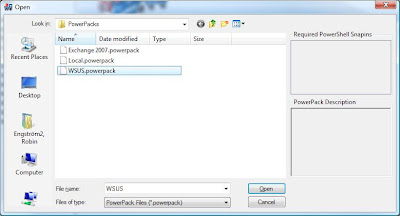
now you can browse around the wsus-tree in powergui and do some really nice stuff. for example, list all the computer models in your network (click Computers > Get-ComputerTargets) and export them to a csv file.
- download and install powergui
- download and extract wsus powerpack
- (you also have to have the wsus administration tools installed on your workstation.)

now you can browse around the wsus-tree in powergui and do some really nice stuff. for example, list all the computer models in your network (click Computers > Get-ComputerTargets) and export them to a csv file.
måndag 17 november 2008
tip of the day
this is a classic but sometimes i forget:
in windows vista press CTRL+ALT while you click on a program to open it in elevated mode.
in windows vista press CTRL+ALT while you click on a program to open it in elevated mode.
tisdag 11 november 2008
boot camp 2.1 update: Error applying transforms.
this is was an irritating one.
boot camp 2.1 update fails because i am using a swedish version of windows vista.
to fix:
open up regedit and locate this key (the productkey kan vary):
change the Language REG_DWORD value to 409 hex.
söndag 9 november 2008
HTPC
i have what we call a "i-landsproblem" in sweden, at home.
we got ourselves a nice big tv yesterday and now i want to retire the old mac mini G4 who served as GUI for the old, smaller tv.
what i want is an interface that looks good on a tv and is maneuverable with only a wireless mouse. all the files are served from two 1TB external iomega drives connected to a HP 2510p laptop, running windows 2008 enterprise edition.
the candidates are:
i think i am going to start by testing xbmc under linux on the HP 6210s.
we got ourselves a nice big tv yesterday and now i want to retire the old mac mini G4 who served as GUI for the old, smaller tv.
what i want is an interface that looks good on a tv and is maneuverable with only a wireless mouse. all the files are served from two 1TB external iomega drives connected to a HP 2510p laptop, running windows 2008 enterprise edition.
the candidates are:
- Mac mini G4 1.4Ghz with 512MB RAM
- HP 6210s, 2Ghz Celeron with 1GB RAM
- Asus EeePC 901, 1,6Ghz intel atom with 2GB RAM
i think i am going to start by testing xbmc under linux on the HP 6210s.
lördag 1 november 2008
tempting...
after watching this (skip the first 20 minutes)
http://channel9.msdn.com/pdc2008/KYN02/
this seems rather tempting:
Microsoft.Windows.7.64Bit.Build.6801.DVD-WinBeta
Microsoft.Windows.7.32Bit.Build.6801.DVD-WinBeta
http://channel9.msdn.com/pdc2008/KYN02/
this seems rather tempting:
Microsoft.Windows.7.64Bit.Build.6801.DVD-WinBeta
Microsoft.Windows.7.32Bit.Build.6801.DVD-WinBeta
onsdag 29 oktober 2008
windows command of the day
you can pipe stdout to the clipboard in windows.
example:
ipconfig /all | clip
example:
ipconfig /all | clip
lördag 25 oktober 2008
google reader keyboard shortcuts
speaking to a unix-consultant at work yesterday, he told me that I had to use the old vi keyboard shortcuts to navigate in a console menusystem.
i told him that it was no problem and that i have owned oreilly's learning the vi editor for eight years.
but then i struck me.
i use the google reader shortcuts a lot and the shortcuts for "up" and "down" is the same as for vi!
"k" for up and "j" for down.
i told him that it was no problem and that i have owned oreilly's learning the vi editor for eight years.
but then i struck me.
i use the google reader shortcuts a lot and the shortcuts for "up" and "down" is the same as for vi!
"k" for up and "j" for down.
fredag 17 oktober 2008
windows command of the day
this is a old one. but sometimes you scratch your head trying to remember this one:
kind of an old shool symoblic link for windows.
lets say for example that you remove a computer from the domain for a retired user that has a lot of files linked to his old home directory. and you have copied over all the files from the network drive to a folder on the local harddrive. and you just want to get it over with and have some well deserved coffee.
use subst and walk away :).
subst:
Associates a path with a drive letter.
kind of an old shool symoblic link for windows.
lets say for example that you remove a computer from the domain for a retired user that has a lot of files linked to his old home directory. and you have copied over all the files from the network drive to a folder on the local harddrive. and you just want to get it over with and have some well deserved coffee.
use subst and walk away :).
in love with resource monitor in server 2008

sitting home on a friday night a bit drunk and monitoring the migration from our old mac-based fileserver at home to the new windows-based one. installing WSUS 3.0 SP1, Windows Deployment Toolkit and running robocopy. listening to old school electronic music and sipping on a beer.
at last some sunshine after a hard week at work.
tisdag 14 oktober 2008
onsdag 8 oktober 2008
dynamic DNS clients is not registering when using non Microsoft DHCP-server
scenario:
the clients are getting their DHCP-leases from a non-microsoft server and is using the DNS-server in server 2003 as DNS.
problem:
no clients are updating their A RR:s in DNS.
accordning to Microsoft, with the default settings, all versions of windows from 2000 and up should register their own A records and ask the DHCP-server to update the corresponding PTR-records.

but in my case, this didn't happen. i verified that it wasnt a permissions error by setting a static IP and saw that the records got registered.
today after tearing my hairs out for months i finally figured out that the "ask the DHCP-server to register"-part is the culprit.
from this draft http://tools.ietf.org/html/draft-ietf-dhc-dhcp-dns-12:
the client sets the 0x00 flags and wants to register its own A-records:

okey, i knew that. but why is it not updating?
then i found this:
the server replies back with the flags 0x03 which tells the client NOT to update its records, because the server will do this for him.

so XP and Vista is following the RFC-draft but the DHCP-server (who has the ability to register the RR's) tells the client not to do it!
aah, the satisfaction of solving a hard problem. can't beat it :)
the clients are getting their DHCP-leases from a non-microsoft server and is using the DNS-server in server 2003 as DNS.
problem:
no clients are updating their A RR:s in DNS.
accordning to Microsoft, with the default settings, all versions of windows from 2000 and up should register their own A records and ask the DHCP-server to update the corresponding PTR-records.

but in my case, this didn't happen. i verified that it wasnt a permissions error by setting a static IP and saw that the records got registered.
today after tearing my hairs out for months i finally figured out that the "ask the DHCP-server to register"-part is the culprit.
from this draft http://tools.ietf.org/html/draft-ietf-dhc-dhcp-dns-12:
"If a client that owns/maintains its own FQDN wants to be responsible for updating the FQDN to IP address mapping for the FQDN and address(es) used by the client, then the client MUST include the Client FQDN option in the DHCPREQUEST message originated by the client. A DHCP client MAY choose to include the Client FQDN option in its DISCOVER messages as well as its REQUEST messages. The rightmost ("S") bit in the Flags field in the option MUST be set to 0.
the client sets the 0x00 flags and wants to register its own A-records:

okey, i knew that. but why is it not updating?
then i found this:
"Even, if the Client FQDN option carried in the DHCPREQUEST message has its Flags field set to 0 (indicating that the client wants to update the A RR), the server MAY (under configuration control) update the A RR. The update MUST be originated following the procedures described in Section 5.4. The server MAY originate the update before the server sends the DHCPACK message to the client. In this case the RCODE from the update [RFC2136] MUST be carried to the client in the RCODE2 field of the Client FQDN option in the DHCPACK message, and the Flags field in the Client FQND option MUST be set to 3."
the server replies back with the flags 0x03 which tells the client NOT to update its records, because the server will do this for him.

so XP and Vista is following the RFC-draft but the DHCP-server (who has the ability to register the RR's) tells the client not to do it!
aah, the satisfaction of solving a hard problem. can't beat it :)
onsdag 1 oktober 2008
söndag 28 september 2008
got myself an eeepc 901!
got the linux model but just booted up into linux once to test how the keyboard felt :).
went into vlite and created a slimmed down vista ultimate cd and copied it to a usb-stick.
used the drivers on asus ftp to get (almost) all the hardware working. after lowering the page file to 200MB and turned of hibernation (open a administrator cmd and type in powercfg -h off) , I got almost 800MB free on my C-drive.
2.7 WEI-points means that i can run the aero-theme if i want. sweet. even if i prefer the windows classic theme set to best performance, as i do on xp.

i am also currently waiting on a 2GB stick of memory that i ordered.
have a feeling that though this installation works perfectly, i am going to wipe the disk soon and see if i can get osx or openbsd installed and working as nicely as vista.
went into vlite and created a slimmed down vista ultimate cd and copied it to a usb-stick.
used the drivers on asus ftp to get (almost) all the hardware working. after lowering the page file to 200MB and turned of hibernation (open a administrator cmd and type in powercfg -h off) , I got almost 800MB free on my C-drive.
2.7 WEI-points means that i can run the aero-theme if i want. sweet. even if i prefer the windows classic theme set to best performance, as i do on xp.

i am also currently waiting on a 2GB stick of memory that i ordered.
have a feeling that though this installation works perfectly, i am going to wipe the disk soon and see if i can get osx or openbsd installed and working as nicely as vista.
onsdag 24 september 2008
nmap 4.76
tried out one of the new graphical versions of the new nmap from insecure.org yesterday evening. one of the new features in the latest version is that nmap draws a topology map over your the hosts you scanned in your network. you can even click one specific host and have the whole view animate and show the network map with that host in focus. looks nice, and is animated!
very far from the old command line versions of the past.
here is a quick scan of my lab network at home:

one thing i noticed was that my C:-drive was full of temporary files after the installation. wtf!

turns out that nmap is only to blame for using Microsoft Visual Studio 2008 C++ redistributible in its windows version. and apperantly its a known (and old) bug.
very far from the old command line versions of the past.
here is a quick scan of my lab network at home:

one thing i noticed was that my C:-drive was full of temporary files after the installation. wtf!

turns out that nmap is only to blame for using Microsoft Visual Studio 2008 C++ redistributible in its windows version. and apperantly its a known (and old) bug.
måndag 22 september 2008
must-have applications on a newly installed windows machine
i reinstall my computers A LOT, and everytime i have to reinstall my favorite applications to be productive.
here is the list:
thats about it. the most needed apps on my computers.
other things that always gets installed sooner or later is: TightVNC, Microsoft Powershell, iTunes and VMware Workstation.
here is the list:
- Notepad++
i finally gave up on using gvim in windows and started using this one instead. no i find that i cant live without it. syntax highlighting for almost everything, free, and with a very small footprint. the only negative i have to say about it is that their site lookes like crap :). - Miranda IM
i use both ICQ and MSN and can't stand eithers default GUI. miranda is clean, free to use and free from advertisements, have plugins for everything and can be customized to infinty. - putty
for all your telnet and SSH needs on windows, putty is the way to go. i have never understood why some techies still use SecureCRT on windows. - Sysinternals Process Monitor
i can never accept that things "just work". i have a craving to know why, when and how. this is the tool i always use the most from the Sysinternals Suite. a bit hard to get a hang of at first, but have a look at Mark Russinovich's webcasts on advanced malware removal and advanced windows troubleshooting on TechNet Spotlight and you will be up and running in no time! also, Mr Russinovich sometimes writes about how he uses procmon in his blog. - mozilla firefox
no comments needed. - WinImage
classic windows app. i use it for extracting files from iso-files. - Total Commander
i use to say that this is the only program i have ever payed for. in reality, i didn't - my friends did. I got a license as a birthday present many many years a go. i grew up using norton commander in DOS and the keyboard shortcuts got stuck in my brain. i can't understand how any power user can use windows explorer to do any serious work. or the mac's horrible finder for that matter. but that is just me. - Virtual Drive Clone
i don't burn DVDs or CDs if i can help it. virtual drive clone from slysoft mounts any ISO, is freeware, works in Vista 64bit and doesn't require a reboot when installed.
thats about it. the most needed apps on my computers.
other things that always gets installed sooner or later is: TightVNC, Microsoft Powershell, iTunes and VMware Workstation.
new design, new language!
i am going to start writing my blogposts here in english to maybe attract a wider audience and to improve my english writing skills.
söndag 21 september 2008
Kurs i Windows Deployment på Labcenter. Lärare: Johan Arwidmark
den här veckan har jag varit i Cannes på semester. veckan innan var jag på kurs på Labcenter med MVP:n Johan Arwidmark. en mycket mycket bra kurs.
Microsoft Deployment Toolkit är inte det lättaste att komma igång med, och det finns dåligt med böcker inom området. det enda jag läst i pappersform hittils är kapitlet om deployment i Jeremy Moskowitzs bok Creating the Secure Managed Desktop - och det är skrivet av ingen annan än Johan Arwidmark själv!
nedan kommer lite minnesanteckningar jag gjorde under kursen.
Windows PE:
USMT:
Blandade godbitar:
är lite sjuk så det får räcka så här för idag.
Microsoft Deployment Toolkit är inte det lättaste att komma igång med, och det finns dåligt med böcker inom området. det enda jag läst i pappersform hittils är kapitlet om deployment i Jeremy Moskowitzs bok Creating the Secure Managed Desktop - och det är skrivet av ingen annan än Johan Arwidmark själv!
nedan kommer lite minnesanteckningar jag gjorde under kursen.
Windows PE:
- minneskravet för WinPE2.1 är inte 512MB som alla tror, utan 448MB RAM. detta för att WinPE räknar med att folk kör med integrerade grafikkort som lånar typ, 64MB från det riktiga RAM.
det har tydligen hänt att när folk försökt deploya en hel hög med lika dana datorer med 512MB RAM så har vissa funkat och vissa inte. då har BIOS varit inställt på att låna mer än 64MB på vissa av burkarna :). lurigt. - en anledning till att man kör setup.exe från en Vista/2008-skiva när man installerar sin master-image och inte extraherar imagen direkt ur wim-filen är att när Microsoft har windows installerat på D: när dom gjort installationen som ligger på skivan!
- baka inte in NIC-drivers för wireless i WinPE-images. när wpeinit körs så kommer ett nätverkskort att bli det primära och konfas för DHCP. om detta är ett wireless så kommer det bli timeout och saker bryter ihop.
- servrar kan ha både drivrutiner för WinPE och vanliga i samma drivrutinspack. är man inte försiktig så kan man få dubbla som ser likadana ut. inte snyggt.
- skapa en egen Out-Of-Box driver group för WinPE. OBS! gör detta från början, det är jobbigt att byta group i efterhand. och en egen grupp gör att WinPE-imagen kan hållas liten och fin.
- du behöver bara uppdatera deploymentpunkten om du påverkat Windows PE på något sätt. task sequences, nya operating systems osv dyker upp automagiskt.
USMT:
- bra scanstate växlar:
scanstate /ue:*\* /ui:DOMÄN\* /uel:60
tar bara användare som loggat in på datorn från domänen. tar bara användare som loggat in de senaste 60 dagarna.
Blandade godbitar:
- sysocmgr.exe - används för att scripta add/remove programs i XP.
- ocsetup.exe - samma som ovanstående fast för Vista
- det går att slå på utökad debug tracing för ett gäng tjänster i windows. kolla HKLM\Software\Microsoft\Tracing och sätt nyckeln EnableFileTracing till 1 för tjänsten du vill slå på loggning för. filerna hamnar i c:\windows\tracing
- i %TEMP%\deployupdates_x86.log står alla kommandon i klartext som MDT kört!
är lite sjuk så det får räcka så här för idag.
"göm" windows-dator på nätverket
en gång i tiden visade en kollega mig hur han brukar "gömma" sina citrix-servrar från att vara synliga när man browsar i nätverket.
har aldrig riktigt haft någon nytta själv av hur man gör men plitar ner det här ändå ifall det kanske kan komma till användning för någon:
net config server /hidden:yes
det som händer är att man säger åt tjänsten Computer Browser att inte broadcasta ut sitt namn via NetBIOS, och att inte svara på andras broadcast. det borde bli lite tystare i nätet helt enkelt!
väl att notera är att detta enbart stänger av möjligheten att "bläddra" i nätverket och hitta en dator den vägen. vanlig fil och skrivardelning fungerar precis som vanligt.
är man cool, eller hatar cmd.exe väldigt mycket kan man även göra ändringen manuellt i registret.
nyckeln ligger här:
HKLM\System\CurrentControlSet\Services\LanmanServer\Parameters\hidden
sätt DWORD-värdet till 1 för att motsvara /hidden:yes (och till noll för att ändra tillbaka, givetvis).
testat från Vista ner till windows 2000. borde funka i ännu äldre versioner av NT.
har aldrig riktigt haft någon nytta själv av hur man gör men plitar ner det här ändå ifall det kanske kan komma till användning för någon:
net config server /hidden:yes
det som händer är att man säger åt tjänsten Computer Browser att inte broadcasta ut sitt namn via NetBIOS, och att inte svara på andras broadcast. det borde bli lite tystare i nätet helt enkelt!
väl att notera är att detta enbart stänger av möjligheten att "bläddra" i nätverket och hitta en dator den vägen. vanlig fil och skrivardelning fungerar precis som vanligt.
är man cool, eller hatar cmd.exe väldigt mycket kan man även göra ändringen manuellt i registret.
nyckeln ligger här:
HKLM\System\CurrentControlSet\Services\LanmanServer\Parameters\hidden
sätt DWORD-värdet till 1 för att motsvara /hidden:yes (och till noll för att ändra tillbaka, givetvis).
testat från Vista ner till windows 2000. borde funka i ännu äldre versioner av NT.
torsdag 4 september 2008
dagens powershell oneliner
task: dra ut alla datornamn som står i en textfil och fråga AD efter description.
börja med att tanka Quests ljuvliga, gratis powershell cmdlets här.
sen:
get-content datorer.txt | get-qadcomputer | select-object name, description
då får man en två fina kolumner i sitt powershell-fönster.
vill man ha ut det i csv så outputar man till export-csv på slutet:
get-content datorer.txt | get-qadcomputer | select-object name, description | export-csv output.csv
börja med att tanka Quests ljuvliga, gratis powershell cmdlets här.
sen:
get-content datorer.txt | get-qadcomputer | select-object name, description
då får man en två fina kolumner i sitt powershell-fönster.
vill man ha ut det i csv så outputar man till export-csv på slutet:
get-content datorer.txt | get-qadcomputer | select-object name, description | export-csv output.csv
onsdag 3 september 2008
även notepad är hottad i Vista!
i xp när man öppnat notepad, suddat ut allting och stänger. då får man frågan om att spara. fast filen blir 0 bytes stor.
men detta är lagat i Vista!
sitter och testar mårdens nya thinkpad x300. helt fantastisk. jag börjar nästan gråta av hur skönt tangentbordet är.
jag måste köpa en thinkpad. NU.
men detta är lagat i Vista!
sitter och testar mårdens nya thinkpad x300. helt fantastisk. jag börjar nästan gråta av hur skönt tangentbordet är.
jag måste köpa en thinkpad. NU.
Prenumerera på:
Inlägg (Atom)
